

 What You Can Do
mw_KlipScript is a script language embedded in clip names that executes functions when clips launch in Ableton Live. Write short scripts directly in your clip names to control rack variations, target different tracks, and randomize parameters—all triggered automatically when clips play.
What You Can Do
- Rack Variation Control: Recall specific variations on Instrument/Audio/MIDI Racks
- Multi-Rack Scripts: Control up to 8 racks sequentially with a single clip
- Track Targeting: Switch between tracks and return tracks within one script
- Randomization: Generate random variation recalls on-the-fly
- Macro Interpolation: Smoothly tween between rack macro values instead of instant changes
- Nested Rack Support: Automatically discovers racks in chains and sub-chains
- Quantization Control: Execute scripts on clip trigger or when clips actually start playing
KlipScript Syntax
Scripts are written using bracket tokens [...] in your clip names. Each token is executed left-to-right when the clip launches.
Basic Syntax
Variation Recall: [N]
Recalls variation N on the current rack. Racks are numbered sequentially (1st rack, 2nd rack, etc.)
Examples:
"Bass [2]"           → Recalls variation 2 on the first rack
"Lead [1][3][0]"     → Recalls var 1 on rack 1, var 3 on rack 2, var 0 on rack 3
"Intro [][][4]"      → Skips racks 1 & 2, recalls var 4 on rack 3
Empty Token: []
Advances to the next rack without recalling. Use this to skip racks.
Track Targeting
Target Track: [tN]
Switches context to track N (1-based). All subsequent rack commands affect that track until another target is specified.
Target Return Track: [sN]
Switches context to return track N (1-based).
Examples:
"[t1][2][3]"         → On track 1: recall var 2 on rack 1, var 3 on rack 2
"[t2][1][s1][4]"     → Track 2 rack 1 gets var 1, then return 1 rack 1 gets var 4
"[t1][0][2][s2][1][2]" → Multiple racks across different tracks
Randomization
Random: [r]
Picks a random variation for the current rack. If you’ve scanned variations, uses that range; otherwise chooses from 0–7.
Examples:
"Lead [r]"           → Random variation on first rack
"Drums [1][r][r]"    → Var 1 on rack 1, random on racks 2 & 3
"[t1][r][t2][r]"     → Random variations on different tracks
Script Execution
- Scripts execute left-to-right
- Up to 8 rack positions per target track
- Each target (track/return) has its own rack position counter
- Clips without tokens do nothing
Setup
Requirements
- Ableton Live Suite 12.2+ (or Live Standard with Max for Live addon)
- Optional: Standalone Max 9 (configure in Live’s File & Folder settings)
Installation
- Drop the device on a track containing Instrument/Audio/MIDI Racks
- Create racks by right-clicking devices and selecting “Group to Rack”
- Setup variations in each rack using the variation controls
- Write scripts in your clip names using the syntax above
- Launch clips and watch the scripts execute
The device automatically discovers up to 8 racks per track, including nested racks.
Example Workflows
Basic Variation Control
Clip names:
"Intro [1]"          → Variation 1 on first rack
"Verse [2]"          → Variation 2 on first rack
"Chorus [3]"         → Variation 3 on first rack
"Bridge [1][2]"      → Var 1 on rack 1, var 2 on rack 2
Multi-Track Composition
Track 1: Place mw_KlipScript device
Clip name: "[t1][2][3][t2][1][4][s1][2]"

Execution:
1. Track 1, rack 1: variation 2
2. Track 1, rack 2: variation 3
3. Track 2, rack 1: variation 1
4. Track 2, rack 2: variation 4
5. Return track 1, rack 1: variation 2
Visual Example:
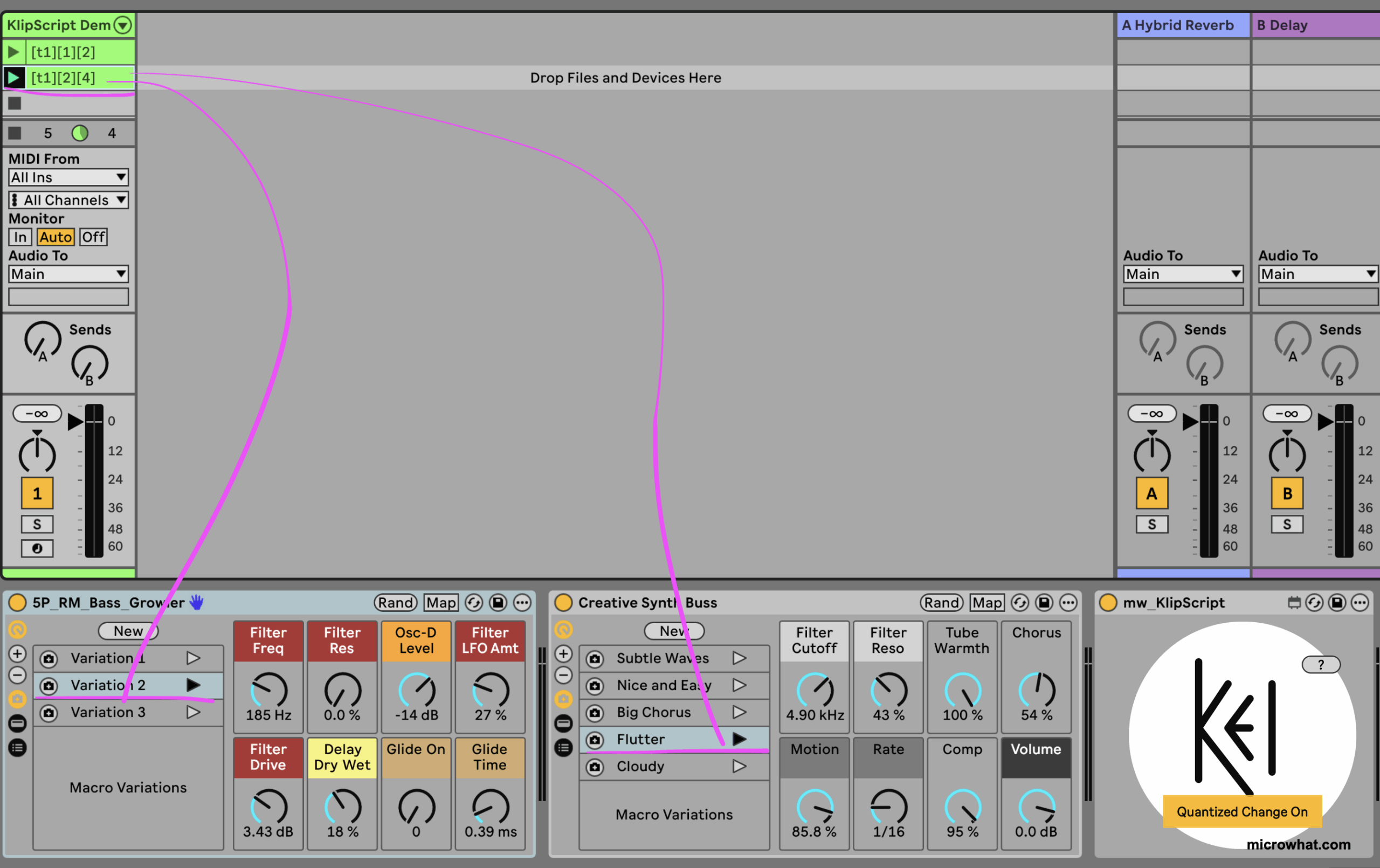
Clip launched with [t1][1][2] – recalls variation 1 on rack 1, variation 2 on rack 2
Clip launched with [t1][2][4] – recalls variation 2 on rack 1, variation 4 on rack 2


Randomized Elements
"Lead [1][r][r]"     → Fixed variation on rack 1, random on racks 2 & 3
"Drums [r][r][r]"    → All three racks get random variations

What others are saying
There are no contributions yet.